Written with AI: Which Is Best Among ChatGPT, Claude, Gemini, and Notion AI? A Writing Scenario Showdown
When it comes to AI writing, what is the real difference between ChatGPT, Claude, Gemini, and Notion AI, and what does each do best? This guide puts the pros and cons of all four tools to the test across real-world writing scenarios (long-form content, editing, brainstorming, and note integration) to help you pick the right one.
"Which AI writing tool is the best?" This is the question I get asked the most, and my answer is always another question: "What do you write the most?" Because ChatGPT, Claude, Gemini, and Notion AI each have distinct strengths and blind spots, they only feel useful when matched with the right scenario. Instead of relying on abstract scores, this article puts them head-to-head across four real-world writing scenarios.
Scenario 1: Writing Long-Form Content & Reading Long Documents
- Claude is often the favorite here: it excels at handling ultra-long documents, maintaining logical consistency in long-form writing, and keeping a natural tone that doesn't sound overly robotic. Feed it a complete report to summarize or rewrite, and it delivers very stable results.
- ChatGPT is also quite powerful, with clear structures for long articles. The main difference is that its style is more "standard," whereas Claude feels more like it's written by a warm human.

Scenario 2: Brainstorming & Ideation
- ChatGPT offers the most comprehensive brainstorming experience with diverse, divergent ideas, plus support for plugins and web browsing.
- Gemini integrates Google Search, allowing it to bring in fresher information during ideation, and its free tier is very generous.

Scenario 3: Editing, Polishing, and Proofreading
- All three conversational AIs can edit text, but for English grammar proofreading, Grammarly remains the most seamless safety net.
- When you need to make text more concise or rephrase it, QuillBot specializes in paraphrasing.
- For high-volume commercial copywriting, take a look at Writesonic.
Scenario 4: Integrating Writing with Notes & Projects
- Notion AI is the undisputed king here: rather than just being a chat window, it writes, summarizes, and drafts directly inside your notes, projects, and databases—so your finished work is right where it needs to be.
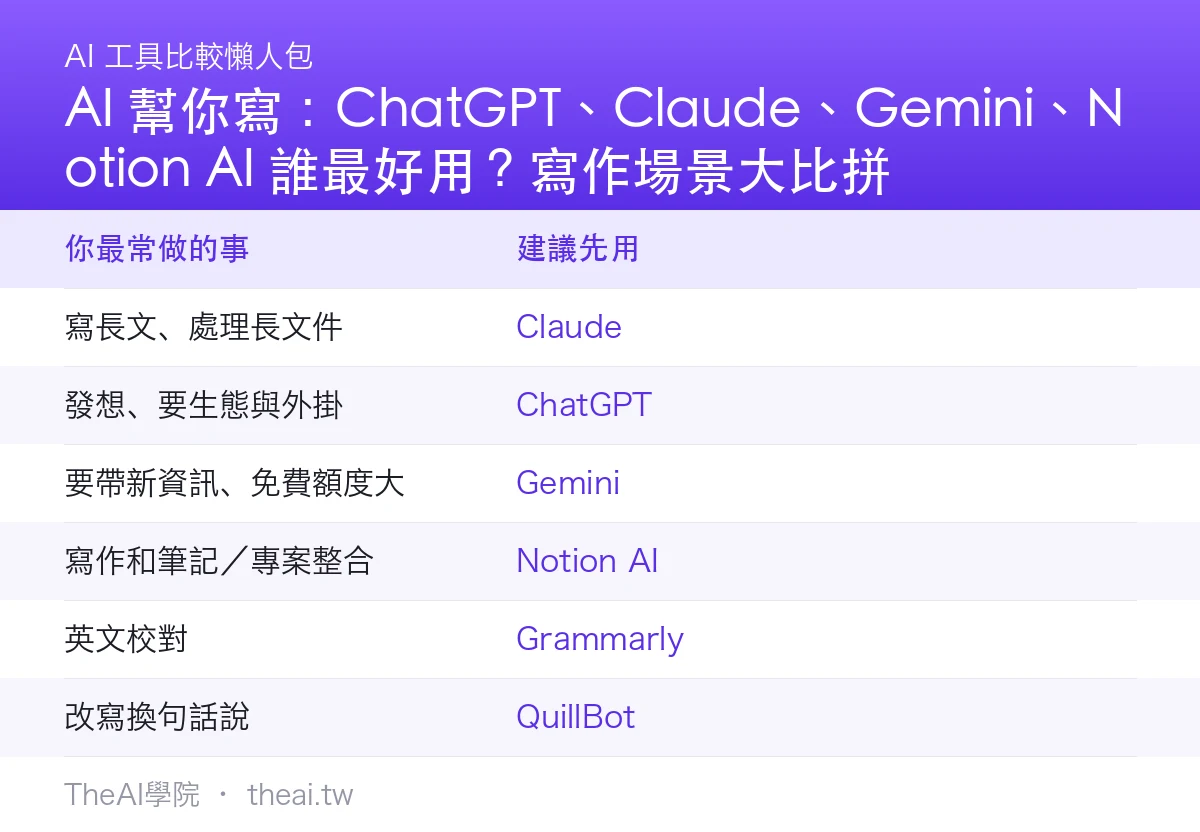
Quick Summary: How to Choose
| What You Do Most | Recommended Starting Tool |
|---|---|
| Write long texts, process long documents | Claude |
| Brainstorm, leverage ecosystem & plugins | ChatGPT |
| Need fresh info, generous free tier | Gemini |
| Integrate writing with notes/projects | Notion AI |
| English proofreading | Grammarly |
| Paraphrasing and rephrasing | QuillBot |
Practical Guide: An AI Collaborative Writing Workflow
- Brainstorming: Use ChatGPT or Gemini to outline angles and structures.
- Drafting: Hand the outline over to Claude to write the first draft, as it maintains stronger logic for long-form content.
- Refining to Your Voice: An AI draft is just a skeleton. You must manually rewrite it to sound like "something you would actually say," adding real experiences and perspectives.
- Proofreading & Polishing: Read through Chinese text yourself; use Grammarly for English, and QuillBot for paraphrasing.
Things to Keep in Mind
- "De-robotize" your content: Publishing raw AI drafts makes them sound robotic. Injecting your own experiences, examples, and tone gives them a human touch, which is what Google and readers value most.
- Fact-check everything: AI can state falsehoods with absolute confidence. Always double-check numbers, citations, and names.
- Don't let AI replace your perspective: It excels at organizing text, but your stances and judgments must come from you.
TheAI Academy Conclusion & Review
There is no single "best" AI writing tool—only the one that best fits your scenario. The most practical approach is to use two or three tools simultaneously: ChatGPT for brainstorming and its ecosystem, Claude for long-form writing and quality, and Notion AI for integrated note-taking. To compare their underlying models, check out our AI Model Database.
Bottom line: Don't ask which tool is the strongest—ask what you write the most. Match the tool to the scenario, and it will work like a charm.
Sources
This article is compiled based on official tool feature descriptions and the editorial team's hands-on writing experience (July 2026). Features and pricing are subject to change; please refer to the official websites for the latest details. Always independently verify facts in AI-generated content.
Frequently Asked Questions
What is the difference between ChatGPT and Claude for writing?
Generally speaking, ChatGPT offers the most comprehensive brainstorming, the most complete ecosystem and plugins, and a standard style. Claude excels at long documents and long-form writing, with strong logical coherence and a more natural, human-like tone. If you frequently write long-form content and value text quality, go with Claude. If you need multi-functionality and plugins, choose ChatGPT.
Will Google flag articles written by AI as low quality?
The key isn't whether you use AI, but whether the content provides value. Treat your AI draft as a first draft: inject your real-world experience, insights, and fact-checked details to strip away the robotic feel. That's how you create quality content that Google approves of. Publishing generic AI drafts as-is is what gets flagged as low quality.
Should I use multiple tools at the same time?
Absolutely. The most practical workflow is using ChatGPT or Gemini for brainstorming, Claude for drafting long-form content, and Notion AI for organizing notes and projects—playing to each tool's strengths. If you're worried about paying for duplicate subscriptions, do an AI subscription audit first.