Student Essentials: 8 Free AI Tools for Papers, Notes, Slides, and Studying
Writing papers, organizing notes, rushing through slide decks, reading dense research—there's a free AI tool to help students conquer almost every academic hurdle. This roundup covers 8 must-have free AI tools for students, complete with their best use cases and handy tips to save you time and money.
As a student, the things you never seem to have enough of are time and money—while reports, notes, and exams are always in endless supply. The good news is that AI can help with both, and many of the most powerful tools out there offer robust free tiers. This guide rounds up 8 AI tools where the free version is more than enough for students, categorized by the exact academic hurdles you'll face. Bookmark this page and keep it handy.
Comprehending and Organizing Materials
- NotebookLM: A brilliant tool by Google. Drop in your textbook PDFs, lecture slides, and notes, and it will answer questions, organize key points, and even generate a podcast based strictly on "your materials" to help you review. Completely free for students—highly recommended.

- Perplexity: An AI search engine that includes source citations. It's faster than Google for researching topics and finding literature, and allows for follow-up questions, making it especially great for fact-checking reports.

Writing and Polishing
- ChatGPT: Great for brainstorming outlines, explaining complex concepts, and smoothing out stiff sentences—a true all-rounder. The free tier is more than enough for everyday use.

- Gemini: Offers a generous free quota and is integrated with Google Search, making it a strong choice for both digging up fresh information and handling writing tasks.

- QuillBot: Ideal for paraphrasing, rewording, and summarizing to make your writing flow better (though don't use it to bypass originality checks).

Presentations and Visuals
- Gamma: Type in an outline and generate a presentation-ready slide deck in just a few minutes. A total lifesaver when you're rushing to finish a report.
- Canva: Perfect for making posters, presentations, and social media graphics. The student plan offers tons of features and includes built-in AI tools.

Focus and Planning
- Goblin Tools: Breaks down a massive task into bite-sized steps, estimates time, and organizes messy to-do lists. It’s exceptionally friendly for anyone who gets easily distracted or doesn’t know where to start, and it is completely free.
At a Glance: Which Tool for Which Task
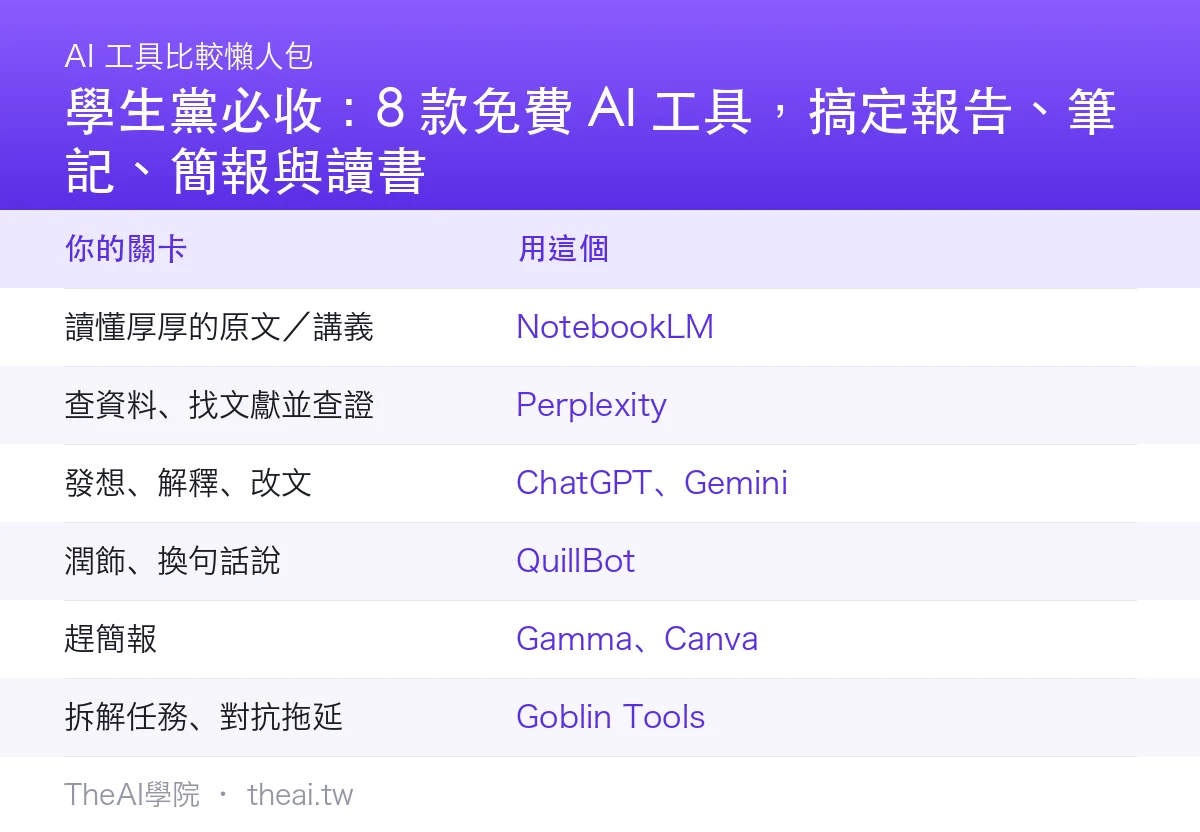
| Your Challenge | Use This |
|---|---|
| Understanding dense textbooks / lecture notes | NotebookLM |
| Researching, finding literature, and fact-checking | Perplexity |
| Brainstorming, explaining, and editing text | ChatGPT, Gemini |
| Polishing and paraphrasing | QuillBot |
| Rushing through presentations | Gamma, Canva |
| Breaking down tasks and beating procrastination | Goblin Tools |
Step-by-Step: Crafting an Efficient Report with AI
- Research: Use Perplexity to explore your topic, find sources, and save trustworthy data.
- Comprehend: Drop your research into NotebookLM to pull out key takeaways and answer your questions.
- Organize: Use ChatGPT to structure the key points into a logical outline.
- Produce: Write the content yourself, polish it with QuillBot, and hand the slide deck over to Gamma.
- Fact-Check: Double-check all numbers, citations, and names yourself.
Important Reminders
- Don't let AI write your entire assignment: Academic integrity is the bottom line. Plus, you won't learn anything, and your exams will expose it anyway. Use AI as a tool to help you understand and organize.
- Always fact-check: AI can hallucinate plausible-sounding false information (even its references might be fake), so always verify before submitting.
- Mind school policies: Different classes have different rules regarding AI use. Check the guidelines carefully before you start.
TheAI Academy Conclusion & Review
The most important skill to build during your student years is learning how to "use AI to learn faster and understand deeper," rather than "using AI to escape learning." Our top recommendation is to start with this free trio: NotebookLM (for understanding materials) + Perplexity (for fact-checking) + Gamma (for crunching out presentations). If you're looking for more free tools, browse our dedicated Free AI Tools section.
Bottom Line: Let AI help you "understand," not "do your homework for you"—that is the golden rule of using AI as a student.
Sources
This article was compiled from the official feature descriptions of various tools and the editorial team's hands-on experience (July 2026). Free quotas and features are subject to change; please refer to the official websites for the latest updates. When using AI to complete assignments, please adhere to your school's policies, course guidelines, and academic integrity standards.
Frequently Asked Questions
Are these AI tools for students really free?
Yes, the tools featured here all offer free tiers that can easily handle everyday homework, note-taking, and presentation needs. Some also offer student discounts or more robust paid versions. Just be sure to check the free usage limits before you start.
Does using AI for assignments violate academic integrity?
Using AI as an assistant to help you understand source material, organize key points, or polish your writing is generally fine. However, having AI write entire assignments or copying content word-for-word crosses ethical lines. Policies vary by institution, so always check your syllabus and course guidelines first.
Why do professors warn us not to trust AI answers blindly?
Because AI can sound completely confident while being completely wrong, sometimes even fabricating realistic-looking citations and statistics. Always double-check any AI-generated facts, quotes, and numbers against original sources before turning your work in.