Stop Fighting Over Meeting Notes: A Showdown of 5 AI Meeting Assistants
Forget about struggling to take notes or spending hours typing up transcripts. We tested and compared 5 AI meeting assistants that automatically transcribe audio, generate summaries, and track action items. See the pros and cons of each, plus tips on how to choose the right one for your team.
Ever have this happen: You finish a one-hour meeting, and five minutes later, you can't remember what was actually decided or who is supposed to do what. The old fix was assigning someone to take notes, but that person spent the entire time typing instead of participating in the discussion. AI meeting assistant tools were built to solve this—they record audio, generate transcripts, pull out key points, and list action items so everyone can stay focused on the meeting. This article puts the top 5 tools to the test for a head-to-head comparison.
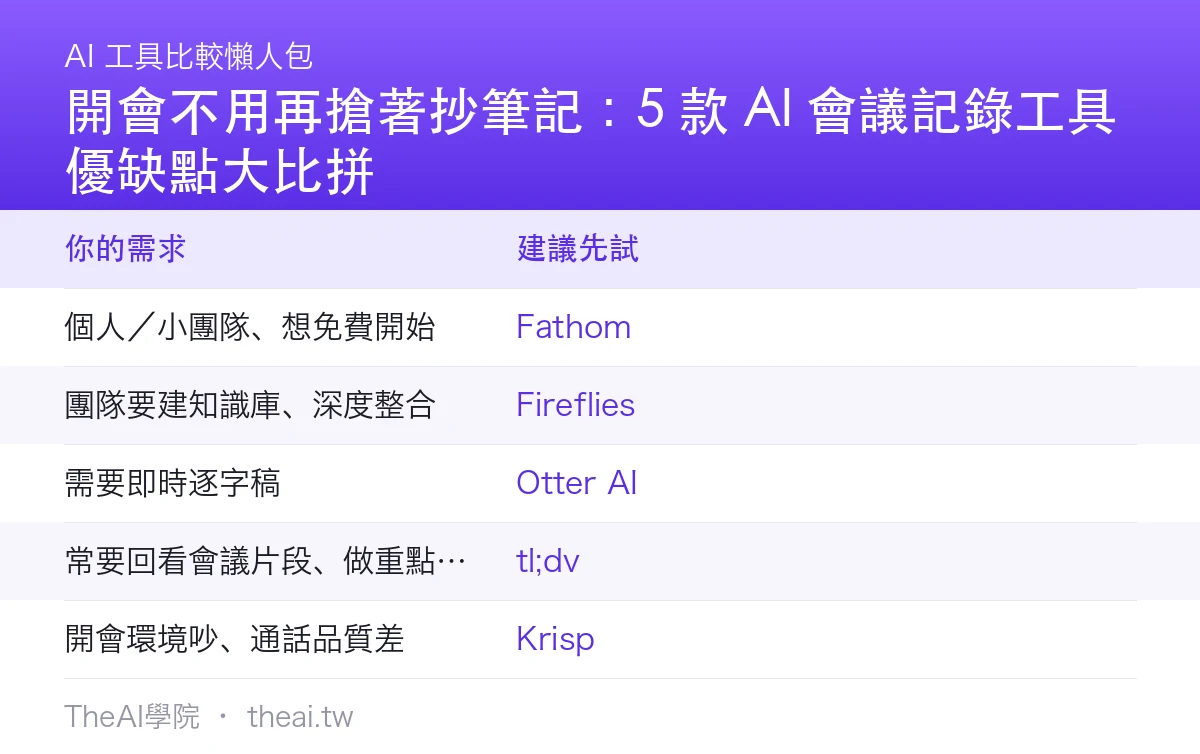
Core Capabilities of These Tools
A good AI meeting tool does a few key things: it converts voice to text in real-time or post-meeting, automatically generates "summaries + decisions + action items (who, when)," lets you search the entire conversation, and syncs with your calendar or collaboration tools. The differences lie in recognition accuracy, language support, integration depth, and pricing.
Head-to-Head: Pros and Cons of the Top 5
Otter AI|A veteran meeting notes tool offering real-time transcription, automated summaries, and key-point tagging. Pros: Strong real-time performance and mature English recognition. Cons: Relatively weak Chinese support, which teams in Taiwan should keep in mind.
Fireflies|Automatically joins your online meetings to record, transcribe, and summarize, supporting multiple languages and integrating with CRM and collaboration tools. Pros: Broad integrations and the ability to build a team knowledge base. Cons: Lots of features, so it takes some time to set up initially.
Fathom|Known for being great right out of the box for free, offering solid recording, summaries, and action items with a clean interface. Pros: Quick to pick up with a very generous free tier. Cons: Fewer advanced team features, but more than enough for individuals and small teams.
tl;dv|Excels at clipping meeting segments into shareable highlight clips and cross-referencing themes across multiple meetings. Pros: "Clip playback" is super practical and multi-language support is included. Cons: Focuses heavily on video review, so those with purely text-based needs might not use all its features.
Krisp|Started out with "AI noise cancellation" (filtering out background noise and keyboard clacking) and now also offers meeting notes and summaries. Pros: Noticeable improvement in call quality with built-in note-taking. Cons: Its core value is noise cancellation, so the note-taking features are relatively lightweight.
Quick Guide: How to Choose
| Your Need | Recommended to Try First |
|---|---|
| Individuals / small teams wanting a free start | Fathom |
| Teams looking to build a knowledge base with deep integrations | Fireflies |
| Needing real-time transcripts | Otter AI |
| Frequently reviewing meeting segments and making highlight clips | tl;dv |
| Noisy meeting environments with poor call quality | Krisp |
Things to Keep in Point
- Proofread Chinese recognition: For meetings with accents, technical terms, or mixed Chinese and English, always spend two minutes proofreading the summary before sending it out.
- Inform participants before recording: Out of politeness and compliance, always let attendees know and get their consent before recording a meeting.
- Exercise discretion for sensitive meetings: For meetings involving confidential or HR matters, check your company policy first before deciding whether to use third-party tools.
TheAI Academy Conclusion and Review
Meeting notes are a classic example of an AI application that requires "one-time setup for long-term time savings." For a painless start, try out the free version of Fathom directly. If your team needs to scale up and build a searchable meeting knowledge base, step up to Fireflies. If you want to take it further by turning meeting summaries into action items and projects, you can pair it with Notion AI.
One-line review: Let everyone stay focused on the meeting instead of scrambling to take notes—that's one of the most tangible values of AI.
Sources
This article is a compilation of the editor's hands-on experience testing various tools (July 2026). Chinese recognition performance varies based on accents and content, so please proofread summaries yourself; official plans and pricing for each tool apply. Please obtain consent from participants before recording any meeting.
Frequently Asked Questions
How accurate is the Chinese speech recognition in AI meeting tools?
English recognition is generally mature and reliable, while Chinese accuracy varies depending on the tool, accents, and industry terminology. Usually, it's "serviceable but requires proofreading." We recommend spending a couple of minutes after the meeting reviewing the summary and action items—especially names, numbers, and technical terms—before sharing them with the team.
Are there free options available?
Yes. Fathom's free plan is more than enough for individuals and small teams, offering robust recording, summaries, and action item tracking. If your team needs a shared knowledge base, deep CRM integration, or advanced collaboration features, you can then consider paid plans like Fireflies.
Do I need to notify attendees before recording a meeting with AI?
Yes. For both professional courtesy and legal compliance, you should always inform participants and get their consent before recording. For sensitive discussions like HR or confidential business matters, always check your company’s policies before using third-party tools.